Conversa: live captions of what is being said around you
A web app for deaf and hard-of-hearing people: it puts on screen, in real time and in your language, what the people at the table are saying, each with their own colour and name. It was built for a grandmother with a tablet; now anyone can use it.
A web app for deaf and hard-of-hearing people: it puts on screen, in real time and in your language, what the people at the table are saying, each with their own colour and name.
The demo needs no key and no microphone. For real use you need a free Deepgram or Speechmatics key.
What it does
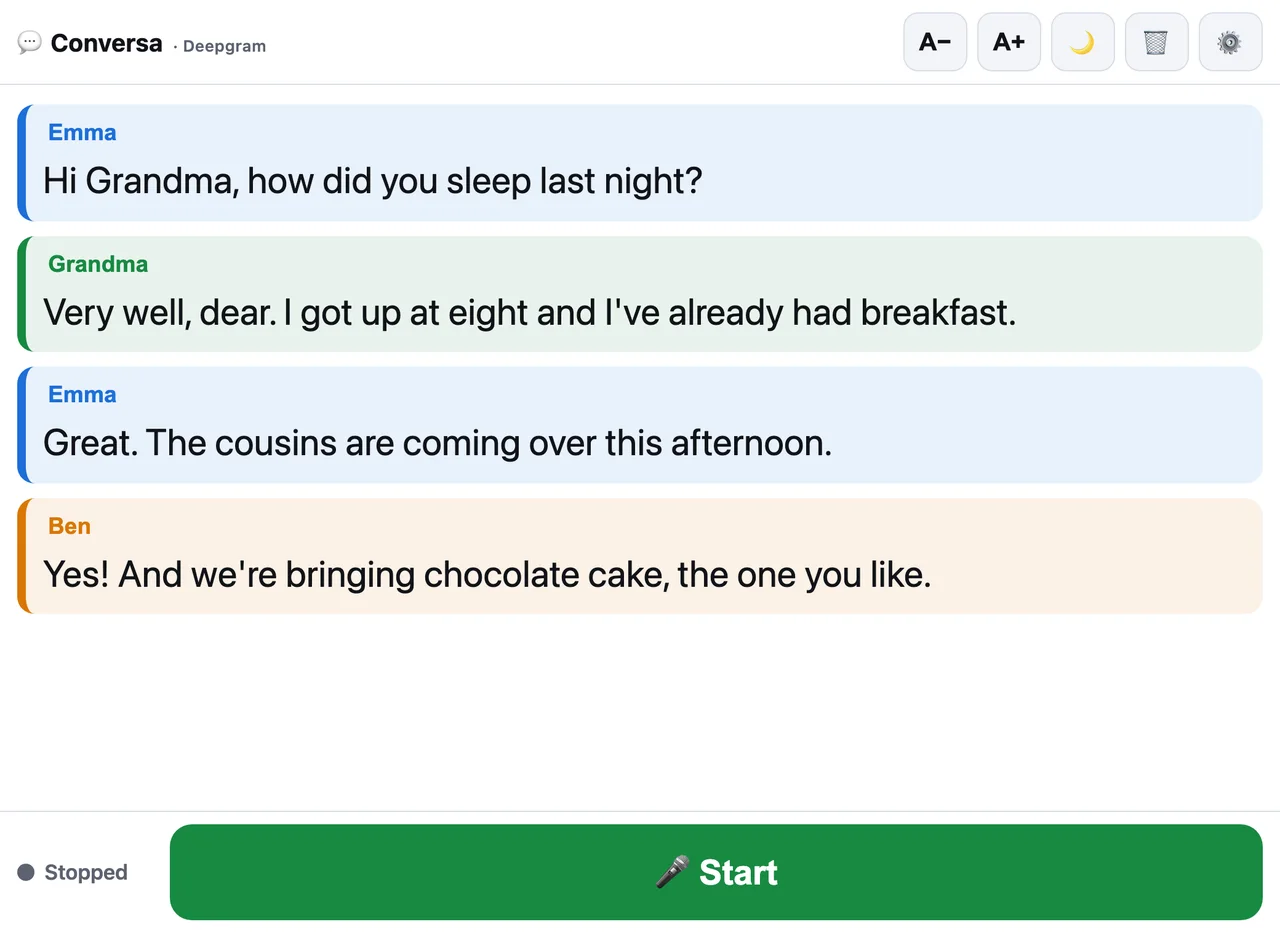
Who said what
Each person gets a bubble in their own colour. Tap the name and put the real one: Grandma, Emma, the doctor.
Type you can actually read
One button raises the size until it reads comfortably from across the table. Light and dark themes.
Nothing is stored
The conversation lives on screen and is deleted when you close it. Airpic never receives the audio or the text.
It lasts the whole lunch
The screen stays on while it listens, and if the Wi-Fi drops it reconnects by itself.
Getting started
Get a free key
Deepgram or Speechmatics, whichever you prefer. The account takes two minutes and both give you credit for months.
Paste it into Settings
Open Conversa, tap ⚙️ and pick the app language and the conversation language. The key stays on the device.
Leave the device on the table
Press Start and that is it. A tablet in the middle works better than a phone in your hand.
Conversa has no server of its own: audio goes straight from your device to the transcription engine, and that engine asks for a key. It is free to sign up and the welcome credit covers months of use. Pick one:
Option A · Deepgram (recommended)
- Go to console.deepgram.com and create an account ($200 of free credit).
- In the menu, “API Keys” → “Create a New API Key”.
- Copy the key (it is shown only once).
Option B · Speechmatics
- Go to portal.speechmatics.com and create an account ($100 of free credit).
- Under “API Keys”, create a new key.
- Copy the key.
Then open Conversa, tap ⚙️ Settings, choose the engine (Deepgram or Speechmatics), paste the key and save. It stays on your device and you never have to enter it again. Recommendation: Deepgram, which tells Spanish speakers apart best.
Privacy
Audio is streamed to the transcription engine you choose only to turn it into text; with the default settings it is not stored. The conversation lives in the tab's memory: close it and it is gone. Airpic never receives the audio or the text: the app talks to Deepgram or Speechmatics directly from your device.
What it costs
The app is free. The transcription engine charges per hour of audio (Deepgram Nova-3 in Spanish with speaker separation is around $0.41 per hour): 30-60 hours a month comes to $12-25, and the welcome credit covers roughly the first year.
Who it is for
Deaf and hard-of-hearing people at family meals, appointments, meetings or classes; carers and families who want grandma to follow the conversation without repeating everything; and anyone who needs live captions of a conversation in any of its seven languages.
FAQ
Which languages does it support?
The app is available in English, Spanish, French, German, Portuguese, Italian and Japanese, and transcribes in the language you choose in Settings (the same seven). App language and conversation language are set separately: you can keep the interface in English and transcribe a conversation in Spanish.
Do I need an Airpic account?
No. Only a key from the transcription engine (Deepgram or Speechmatics), which you create on their site and paste once into Settings.
Does it work offline?
No: transcription happens in the engine's cloud. It does work on mobile data and reconnects by itself if the Wi-Fi drops.
Is the conversation saved?
No. It is deleted when you close the app. Only the key and the preferences (font size, theme) remain on the device.
Which device works best?
An Android tablet or an iPad in the middle of the table, with Chrome, and the app added to the home screen. It also works on a phone.
Conversa is the front door to Airpic
Airpic is a suite of AI image and video tools. Upscale for print, restore old photos, remove backgrounds, transcribe a meeting or cut shorts from a long video. No account, and you only pay if you download the result.